AI Companion Robots for Seniors: What Works, What Doesn't
ElliQ, KATA Friends, and a new wave of AI companions are reducing senior isolation. Here's what works, what doesn't, and what they cost.
This guide contains affiliate links. If you purchase through these links, we may earn a small commission at no extra cost to you. This helps support The Adaptist.
Social isolation among seniors isn’t just a quality-of-life issue—it’s a health crisis. The US Surgeon General’s 2023 advisory equated loneliness to smoking 15 cigarettes daily. With 4.1 million Americans turning 65 every year through 2027, AI companion robots have evolved from novelties into genuine health interventions. Here’s what works in 2026, what doesn’t, and how to choose the right one.
Why Companions Matter More Than Gadgets
The longevity economy hit $35 trillion in 2026. Over half of CES health exhibits tied to it. But the technology that makes the biggest difference isn’t a wearable or a diagnostic—it’s something that talks back.
Research consistently shows:
- Seniors using daily AI interaction report 25-30% reduction in loneliness scores (UCLA Loneliness Scale)
- Medication adherence improves 15-20% with proactive reminders from a companion device
- Cognitive stimulation from daily conversation helps maintain verbal fluency
- Structured daily interaction creates routine, which is protective against depression
AI companions aren’t replacing human connection—they’re filling the gaps between visits, calls, and social activities. For families navigating the broader challenge of helping parents stay home safely, our essential tech for aging in place guide covers the full technology stack from medical alerts to smart home safety.
The Top Contenders in 2026
1. ElliQ by Intuition Robotics
Most Mature Option — $250 + $30/month
ElliQ has been refined over multiple generations and remains the most polished senior companion. It’s a small tabletop device with a lamp-like head that turns toward you when speaking—a subtle but effective design choice that creates presence.
Key features:
- Proactive engagement — ElliQ initiates conversations, suggests activities, and reminds users to hydrate and move. It doesn’t wait to be asked
- Personality learning — Adapts conversation topics and humor to the user’s preferences over time
- Health check-ins — Daily mood and wellness questions with trends shared to family members
- Video calling — Simplified one-touch video calls to family through its built-in screen
- Cognitive games — Trivia, memory games, and guided meditation
ElliQ works best for seniors who live alone and are still cognitively sharp but socially isolated. It requires WiFi and a moderate comfort level with talking to a device.
ElliQ by Intuition Robotics
Best for Independent SeniorsProactive AI companion that initiates conversations, suggests activities, and shares wellness trends with family. Includes video calling, cognitive games, and daily health check-ins.
2. SwitchBot KATA Friends
Best Smart Home Integration — Launching Q2 2026, estimated $200 + subscription TBD
KATA Friends combines companionship with practical smart home control—a dual purpose that may increase adoption since the device is useful even on days the senior doesn’t feel like chatting.
Key features:
- Smart home control — Adjust lights, check the weather, control thermostat, announce visitors at the door
- Conversational AI — General conversation, reminiscing prompts, and daily briefings
- Physical form factor — Small robot that moves on a desk, creating a sense of animated presence
- SwitchBot ecosystem — Integrates with SwitchBot’s affordable smart home devices for comprehensive home management
The smart home angle is strategic: families can justify the purchase for practical utility (controlling lights and thermostats), with the companion aspect as an added benefit that reduces resistance.
3. Miro-E
Best for Dementia Care — $2,500 (primarily institutional pricing)
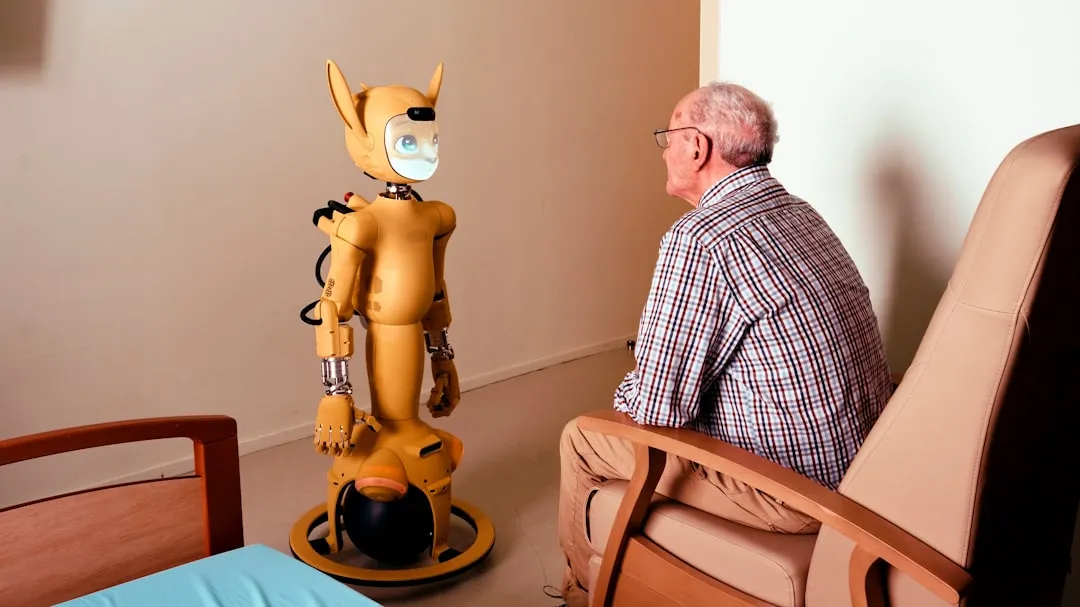
Miro-E takes a fundamentally different approach: it looks and behaves like a small animal, not a technology device. The rabbit-sized robot responds to touch, makes eye contact, and expresses emotions through ear and tail movement.
Key features:
- Non-verbal interaction — Responds to petting, holding, and proximity without requiring verbal commands
- Anxiety reduction — Studies show 40% reduction in agitation episodes in dementia care settings
- No setup required — No WiFi, no accounts, no configuration. Turn it on and interact
- Sensory engagement — Soft fur, warmth, and responsive movement provide tactile comfort
Miro-E is specifically designed for users with cognitive decline who may not understand or engage with screen-based or conversational AI. The price point reflects its institutional target market, but it’s available for home use.
4. Amazon Alexa + Echo Show 8 as Companion
Most Affordable Option — Echo Show 8: $130 + Alexa Together: $20/month
Not a dedicated companion robot, but Amazon’s Alexa Together service adds companion-like features to existing Echo devices:
- Activity alerts — Notify family if no Alexa interaction by a set time
- Drop-in calling — Family can video call without the senior needing to answer
- Reminders — Medication, appointment, and activity reminders
- 24/7 urgent response — Professional monitoring for emergencies
- Daily conversation — Alexa’s conversational abilities have improved significantly, though it still feels more like a utility than a companion
The main advantage is cost and familiarity—many seniors already have or know how to use Alexa devices.
Comparison Table
| Device | Cost | Monthly | Best For | Requires WiFi |
|---|---|---|---|---|
| ElliQ | $250 | $30 | Independent seniors living alone | Yes |
| KATA Friends | ~$200 | TBD | Seniors wanting smart home control + company | Yes |
| Miro-E | $2,500 | $0 | Dementia and cognitive decline | No |
| Alexa Together | $130* | $20 | Budget-conscious / already using Alexa | Yes |
*Echo Show 8 device cost
What Families Should Know Before Buying
Setup and Maintenance
The biggest barrier isn’t cost—it’s setup and ongoing support. Plan to spend an afternoon configuring the device, connecting WiFi, and adding contacts. Most companions need stable internet, which means ensuring your parent’s home has reliable WiFi coverage (particularly near where the device will be placed). If you’re also considering a tablet for video calls and browsing, our best tablets for grandparents guide covers the most senior-friendly options.
The Adoption Question
The best predictor of adoption: whether the senior lives alone. Solo dwellers engage 3x more than those with a spouse at home. Other factors:
- Existing comfort with voice assistants — Prior Alexa/Siri users adapt faster
- Personality — Extroverts and people who enjoy conversation adopt more readily
- Placement — Devices placed in the kitchen or living room (high-traffic areas) see more engagement than bedroom placement
Try Before You Commit
Check return policies before purchasing. ElliQ offers a 30-day trial. Amazon’s return window is 30 days. If your parent refuses to engage after two weeks, having an exit plan matters.
Privacy Considerations
All WiFi-connected companions transmit some data to their providers. Review each company’s privacy policy regarding:
- Whether conversations are recorded and stored
- What health data is shared and with whom
- Whether data is used for training AI models
- How to delete data if you discontinue the service
The Verdict
For independent seniors living alone who are cognitively sharp, ElliQ at $250 + $30/month provides the most complete companion experience. Its proactive engagement is the key differentiator—it doesn’t wait for the senior to initiate interaction.
For families wanting practical utility alongside companionship, KATA Friends (once available) offers the compelling combination of smart home control and social interaction.
For seniors with dementia or significant cognitive decline, Miro-E is in a category of its own—no other product addresses this population as thoughtfully.
The technology works. The challenge is getting it set up and accepted. Invest the time in a proper introduction, and these devices can meaningfully improve a senior’s daily life.
6-Month Adoption Reality Check
Buying a companion robot is the easy part. Keeping it in use is where most families struggle. Industry data from Intuition Robotics and independent aging-in-place researchers paint a realistic picture of what happens after the novelty wears off.
Retention Rates
ElliQ reports that active users average 30+ daily interactions after six months — a strong retention signal. But that’s among users who made it past the first month. Across the companion device category broadly, roughly 30-40% of devices are abandoned within the first 90 days, a pattern consistent with most consumer health technology.
Common Abandonment Reasons
- WiFi issues — Spotty connectivity leads to frustrating pauses and failed commands. If the device doesn’t respond reliably, seniors stop trying
- Repetitive interactions — Some users report that conversations start to feel scripted after several weeks, particularly with less sophisticated devices
- Family disengagement — When family members stop checking the companion’s reports or using its video call features, the senior loses motivation
- Physical placement — Devices placed in a spare room or bedroom corner get forgotten. Kitchen and living room placement is critical
- Hearing difficulties — Seniors with untreated hearing loss struggle with voice-based interaction, leading to frustration and disuse. Modern hearing aids with smart home integration can help bridge this gap
What Predicts Long-Term Use
Research from aging-in-place studies identifies three factors that predict whether a companion device will still be in use at six months:
- Family involvement in the first two weeks — Seniors whose family members actively used the device with them during setup and the initial period were 2x more likely to be active users at 6 months
- Living alone — Solo dwellers have the strongest sustained engagement because the companion fills a genuine daily need for social interaction
- Proactive device design — Devices that initiate contact (like ElliQ) retain users at higher rates than devices that wait to be spoken to (like standard Alexa). The difference is significant: proactive devices see roughly 50% higher 6-month engagement
The takeaway: budget time for a two-week “onboarding” period where you actively participate in your parent’s use of the device. Don’t just set it up and leave.
Insurance and FSA/HSA Coverage
One of the most common questions families ask: can you use insurance or pre-tax health accounts to pay for a companion robot? The answer is evolving.
FSA/HSA Eligibility
As of 2026, dedicated medical devices are FSA/HSA eligible, but companion robots fall into a gray area. Here’s what qualifies:
- Alexa Together with Echo Show — The Echo Show hardware is generally not FSA/HSA eligible on its own, but the Alexa Together subscription may qualify if prescribed as part of a care plan. Get a Letter of Medical Necessity (LMN) from your parent’s physician
- ElliQ — Not currently listed as a standard FSA/HSA item, but some families have successfully submitted claims with a physician’s LMN citing social isolation as a health risk factor. Success varies by plan administrator
- Miro-E — More likely to qualify when prescribed for dementia care, especially through institutional care plans. The clinical evidence base for animal-like therapy robots is stronger for reimbursement purposes
Medicare and Medicaid
Traditional Medicare does not cover companion robots. However, Medicare Advantage plans (Part C) increasingly include supplemental benefits for loneliness intervention and aging-in-place technology. Check your parent’s specific MA plan — some now offer allowances of $500-$1,500 annually for approved health-related technology.
Several state Medicaid waiver programs also cover assistive technology for aging in place. Contact your state’s Medicaid office or Area Agency on Aging to check eligibility.
How to Submit a Claim
- Get a Letter of Medical Necessity from your parent’s primary care physician or geriatrician. The letter should cite social isolation, loneliness, or cognitive stimulation as the medical justification
- Keep the purchase receipt and any subscription invoices
- Submit to your FSA/HSA administrator with the LMN attached. If initially denied, appeal — many plans have a manual review process for non-standard items
- For Medicare Advantage, call the plan’s member services line and ask specifically about “supplemental benefits for aging-in-place technology” or “loneliness intervention devices”
This guide is part of our Aging in Place Guide 2026 series. Related reading:
- The Boomer Turns 80: Essential Tech for Helping Parents Age in Place
- Best Tablets for Grandparents 2026
- Teaching Older Adults New Technology: A Guide That Actually Works
- Samsung Brain Health on Galaxy Watch
- Smart Home Compatibility Checker
Frequently Asked Questions
Will a companion robot make my parent less likely to socialize with humans?
Research suggests the opposite. ElliQ users report increased motivation to call family and attend social activities after using the device. The companion fills lonely gaps (early mornings, late evenings) rather than replacing human interaction. Think of it as a bridge, not a substitute.
What happens if the internet goes down?
WiFi-dependent devices (ElliQ, KATA Friends, Alexa) go silent during outages. Miro-E continues working since it’s fully standalone. For WiFi-dependent devices, consider a cellular backup (like a hotspot) if your parent’s internet is unreliable. This is particularly important if the device is also serving as a safety check-in system.
Can these devices detect falls or medical emergencies?
Not directly. Companion robots are designed for social engagement, not safety monitoring. For fall detection, pair with a dedicated system — our guide to unobtrusive fall detection devices covers the best options that work without requiring a wearable. Alexa Together is the exception — it includes 24/7 urgent response, but this relies on the senior verbally calling for help, not automatic detection.
How much do companion robots cost long-term?
The total cost depends heavily on the subscription model. ElliQ runs $250 upfront plus $30/month ($610 first year, $360/year after). Alexa Together is $130 for an Echo Show 8 plus $20/month ($370 first year, $240/year after). Miro-E is $2,500 with no ongoing subscription. KATA Friends pricing isn’t finalized yet. Over three years, ElliQ totals roughly $1,330, Alexa Together about $850, and Miro-E stays at $2,500. Factor in potential WiFi upgrades if your parent’s internet is unreliable — a mesh WiFi system adds $150-$300 upfront.
Can companion robots help with medication reminders?
Yes, but with important limitations. ElliQ and Alexa both support medication reminders — you can set specific times and medication names, and the device will proactively prompt the senior. ElliQ reports that medication adherence improves 15-20% with its reminder system. However, no companion robot can verify that the medication was actually taken or dispense pills. For seniors who need physical medication management, pair the companion with a dedicated automatic pill dispenser. The companion handles the reminder and social follow-up (“Did you take your morning pills?”), while the dispenser handles the logistics.
More in Lifestyle & Home
Best Budgeting Apps 2026: We Tested 12 for 90 Days
We used every major budgeting app for 90 days. YNAB, Monarch, Copilot, and more ranked by what actually changes spending behavior.
Best Mental Health Apps 2026: What Therapists Actually Recommend
We asked 20 therapists which mental health apps they recommend to patients. The honest results, plus what research says works.
The True Cost of Streaming in 2026: Fees You're Probably Missing
Your streaming bill is higher than you think. We break down the hidden fees, forgotten subscriptions, and bundle traps adding $300-600/year to most households.
From Other Topics
How to Ace Interviews After a Career Change in 2026
Career changers fail interviews by apologizing for their background. Scripts and frameworks that turn your non-traditional path into an advantage.
Education & LearningBest Math Apps for Kids 2026: What Actually Builds Number Sense
We tested the top math apps for kids K-8. Which ones build real number sense vs. which ones just drill facts. Organized by age and skill level.
Education & LearningBest Robotics Kits for Kids 2026: Build Real Engineering Skills
We tested 15 robotics kits with kids ages 4-14. Which ones build real engineering skills vs. which are expensive toys. Ranked by age group.